# HƯỚNG DẪN MAP NETWORK MÁY CHỦ (Ví dụ: Công trình GREEN TOWER)

##### <span style="background-color: rgb(224, 62, 45);">**<span style="font-size: 14pt; line-height: 115%; font-family: 'Times New Roman', serif; background-color: rgb(224, 62, 45);">- Lưu ý: </span><span style="font-size: 14pt; line-height: 115%; font-family: 'Times New Roman', serif; background-color: rgb(224, 62, 45);">Các công trình khác chỉ cần đổi IP máy chủ theo đúng công trình.</span>**</span>

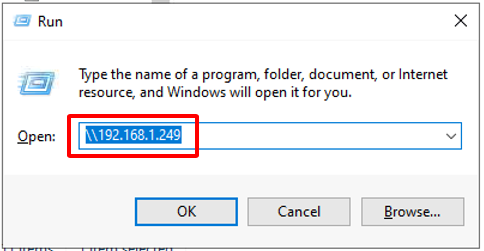
**<span style="font-size: 14.0pt; line-height: 115%; font-family: 'Times New Roman',serif;">Bước 1: Bấm phím Windowns + R và nhập ip: </span>\\\\192.168.1.249**

**<span style="font-size: 14.0pt; line-height: 115%; font-family: 'Times New Roman',serif;">Sau đó bấm OK.</span>**

[![image.png](https://guide.solenc.vn:443/uploads/images/gallery/2024-12/scaled-1680-/ULlimage.png)](https://guide.solenc.vn:443/uploads/images/gallery/2024-12/ULlimage.png)

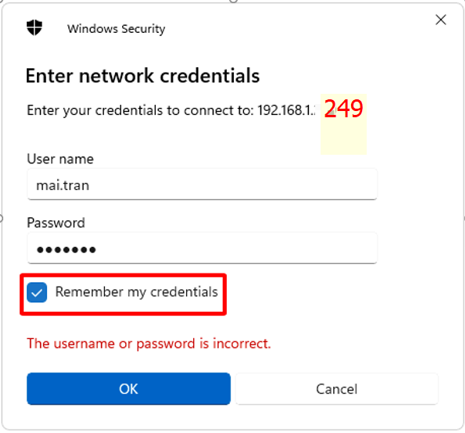
**<span style="font-size: 14.0pt; line-height: 115%; font-family: 'Times New Roman',serif;">Bước 2: Nhập tài khoản và mật khẩu máy chủ đã được cấp trước đó theo danh sách BCH.</span>**

**<span style="font-size: 14.0pt; line-height: 115%; font-family: 'Times New Roman',serif;">Lưu ý: Nhớ tick vào ô Remember my credentials. Sau đó bấm OK!</span>**

[![image.png](https://guide.solenc.vn:443/uploads/images/gallery/2024-12/scaled-1680-/pJrimage.png)](https://guide.solenc.vn:443/uploads/images/gallery/2024-12/pJrimage.png)

<span style="mso-no-proof: yes;">  
</span>

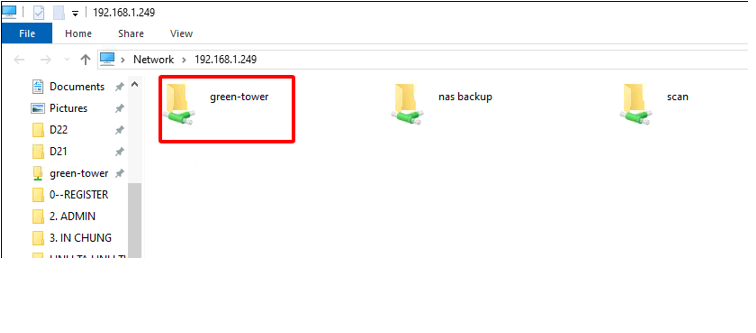
**<span style="font-size: 14.0pt; line-height: 115%; font-family: 'Times New Roman',serif;">Bước 3: Chọn folder green-tower</span>**

<span style="mso-no-proof: yes;"> </span>

[![image.png](https://guide.solenc.vn:443/uploads/images/gallery/2024-12/scaled-1680-/RdUimage.png)](https://guide.solenc.vn:443/uploads/images/gallery/2024-12/RdUimage.png)

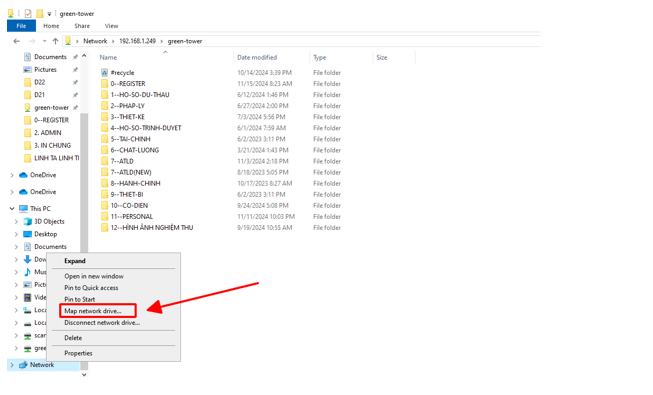
**<span style="font-size: 14.0pt; line-height: 115%; font-family: 'Times New Roman',serif;">Bước 4: Copy đường link sau: \\\\192.168.1.249\\green-tower (Lưu ý: Mỗi công trình sẽ có đường dẫn folder khác nhau)</span>**

<span class="MsoHyperlink"><span style="font-size: 14.0pt; line-height: 115%; font-family: 'Times New Roman',serif; color: black; mso-themecolor: text1; mso-style-textoutline-type: none; mso-style-textoutline-outlinestyle-dpiwidth: 0pt; mso-style-textoutline-outlinestyle-linecap: flat; mso-style-textoutline-outlinestyle-join: round; mso-style-textoutline-outlinestyle-pctmiterlimit: 0%; mso-style-textoutline-outlinestyle-dash: solid; mso-style-textoutline-outlinestyle-align: center; mso-style-textoutline-outlinestyle-compound: simple; mso-effects-shadow-color: black; mso-effects-shadow-themecolor: dark1; mso-effects-shadow-alpha: 40.0%; mso-effects-shadow-dpiradius: 3.0pt; mso-effects-shadow-dpidistance: 1.5pt; mso-effects-shadow-angledirection: 2700000; mso-effects-shadow-align: topleft; mso-effects-shadow-pctsx: 100.0%; mso-effects-shadow-pctsy: 100.0%; mso-effects-shadow-anglekx: 0; mso-effects-shadow-angleky: 0;">Và làm theo hướng dẫn bên dưới..</span></span>

[![image.png](https://guide.solenc.vn:443/uploads/images/gallery/2024-12/scaled-1680-/wbCimage.png)](https://guide.solenc.vn:443/uploads/images/gallery/2024-12/wbCimage.png)
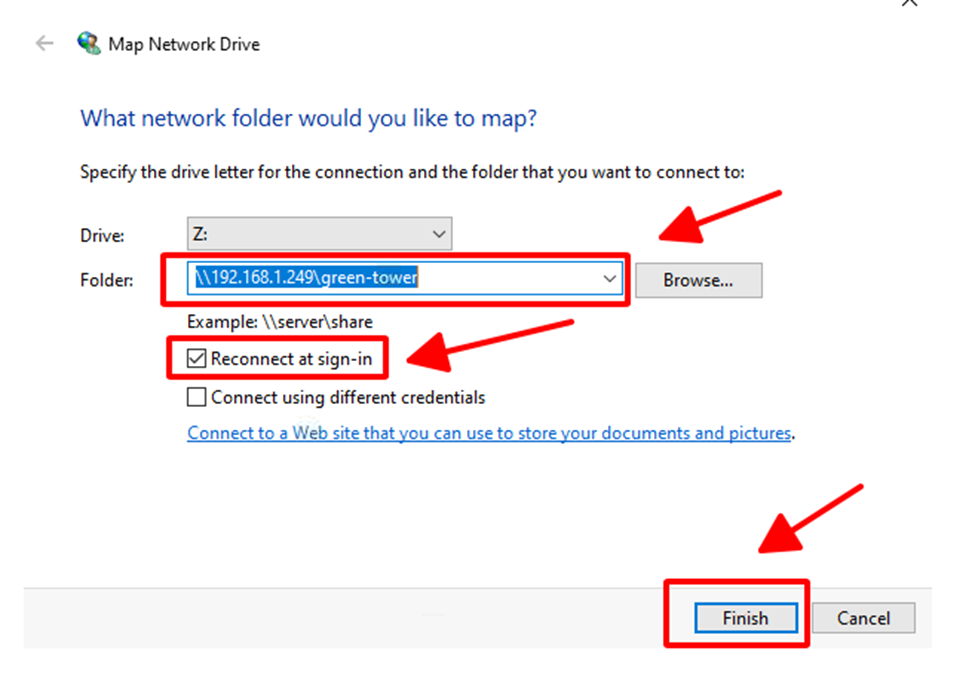
<span style="mso-no-proof: yes;">  
</span>

<span style="mso-no-proof: yes;">![](https://guide.solenc.vn:443/uploads/images/gallery/2024-12/embedded-image-ydyzmrsg.png)</span>

<span style="font-size: 14.0pt; line-height: 115%; font-family: Wingdings; mso-fareast-font-family: Wingdings; mso-bidi-font-family: Wingdings; mso-bidi-font-weight: bold;"><span style="mso-list: Ignore;"><span style="font: 7.0pt 'Times New Roman';"><span style="font-family: Wingdings;"> </span></span><span style="font: 7.0pt 'Times New Roman';"> <span style="background-color: rgb(230, 126, 35);">**<span style="font-size: 14pt; line-height: 115%; font-family: 'Times New Roman', serif; background-color: rgb(230, 126, 35);">=&gt; </span>**</span></span></span></span><span style="background-color: rgb(230, 126, 35);">**<span style="font-size: 14pt; line-height: 115%; font-family: 'Times New Roman', serif; background-color: rgb(230, 126, 35);">Làm tương tự với folder scan: \\\\192.168.1.249\\scan</span>**</span>

### **<span style="font-size: 14.0pt; line-height: 115%; font-family: 'Times New Roman',serif;"><span style="background-color: rgb(241, 196, 15);"> <span style="background-color: rgb(236, 240, 241); color: rgb(224, 62, 45);">Nếu gặp lỗi Map network drive vui làm theo các bước sau:</span></span></span>**

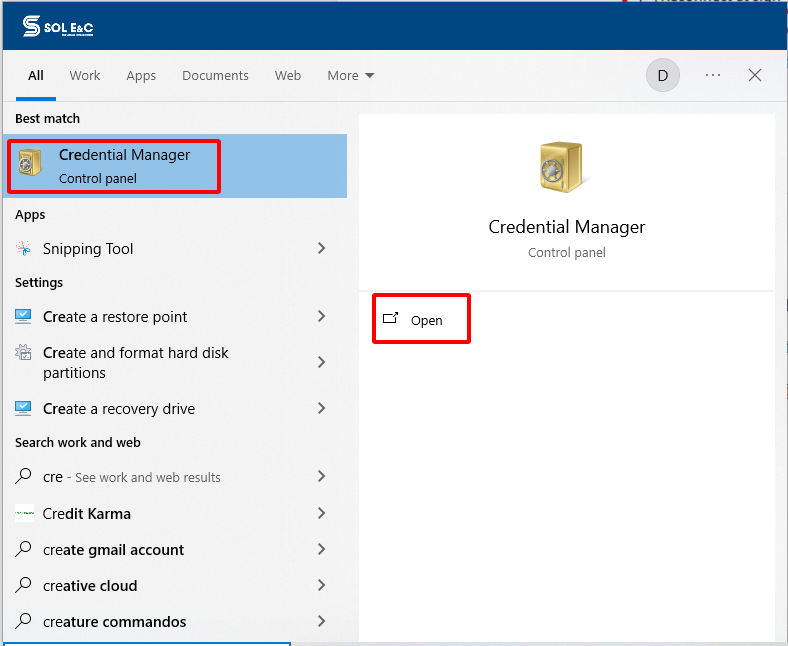
**<span style="font-size: 14.0pt; line-height: 115%; font-family: 'Times New Roman',serif;">Bước 1: Tìm ở cửa sổ windowns: Credential Manager</span>**

[![image.png](https://guide.solenc.vn:443/uploads/images/gallery/2024-12/scaled-1680-/RyWimage.png)](https://guide.solenc.vn:443/uploads/images/gallery/2024-12/RyWimage.png)

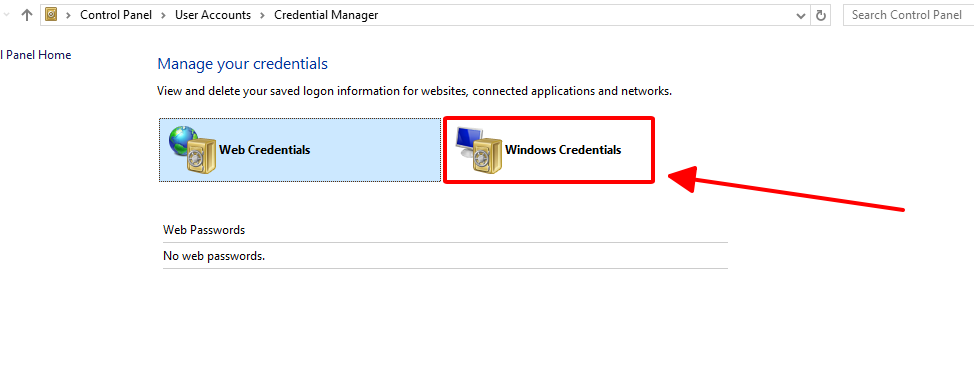
**<span style="font-size: 14.0pt; line-height: 115%; font-family: 'Times New Roman',serif;">Bước 2: Chọn Windowns Credentials</span>**

[![image.png](https://guide.solenc.vn:443/uploads/images/gallery/2024-12/scaled-1680-/GQVimage.png)](https://guide.solenc.vn:443/uploads/images/gallery/2024-12/GQVimage.png)

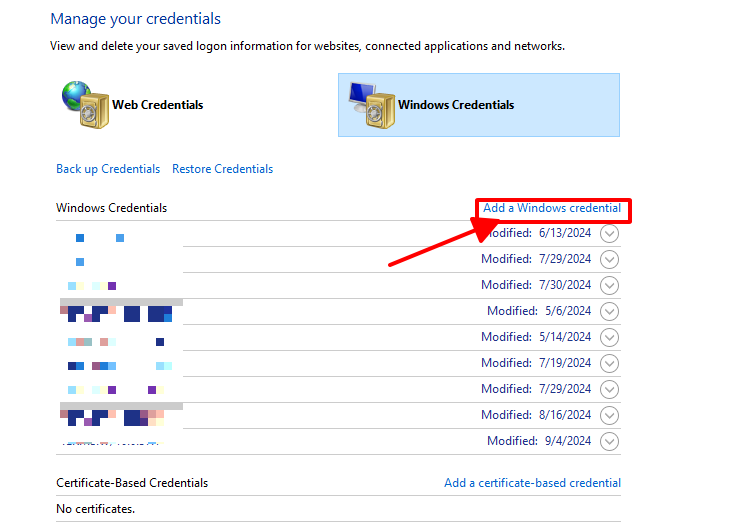
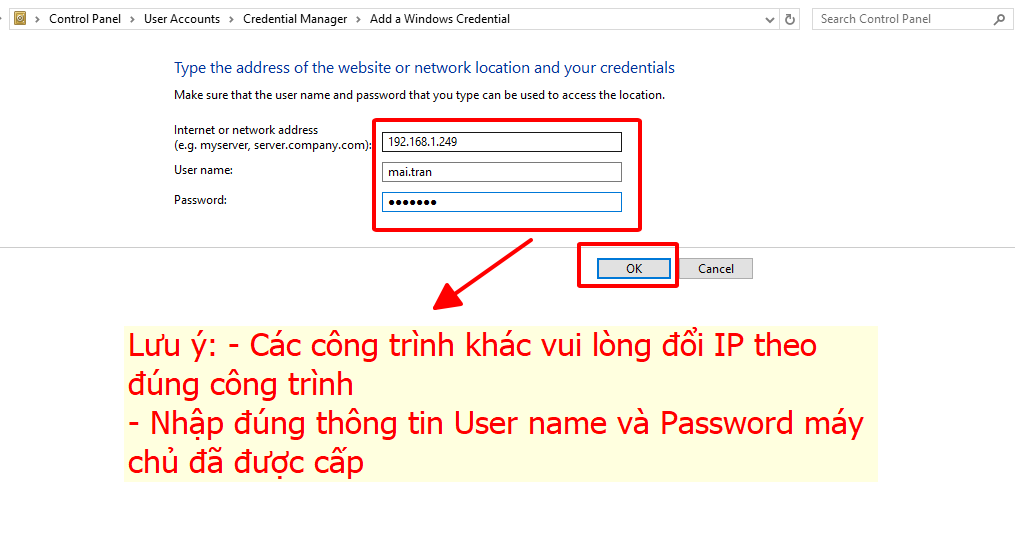
**<span style="font-size: 14.0pt; line-height: 115%; font-family: 'Times New Roman',serif;">Bước 3: Chọn Add a Windows credential =&gt; Nhập thông tin theo hướng dẫn =&gt; Bấm Ok để hoàn thành sau đó tiến hành Map network drive như hướng dẫn ở trên.</span>**

[![image.png](https://guide.solenc.vn:443/uploads/images/gallery/2024-12/scaled-1680-/UMtimage.png)](https://guide.solenc.vn:443/uploads/images/gallery/2024-12/UMtimage.png)

[![image.png](https://guide.solenc.vn:443/uploads/images/gallery/2024-12/scaled-1680-/XnSimage.png)](https://guide.solenc.vn:443/uploads/images/gallery/2024-12/XnSimage.png)